Vacation Project: Do a little step function dance
June 24, 2020
Today’s accomplishment was crafting the first cut of a Step Function deployed via SAM & CloudFormation. I went head first into writing code… and quickly realized my previous drawing needed some more love. I redrew my previous step function so I could track the input parameters and detail the decision points. Here is that new drawing along with how AWS visualized it via the Step Functions console:
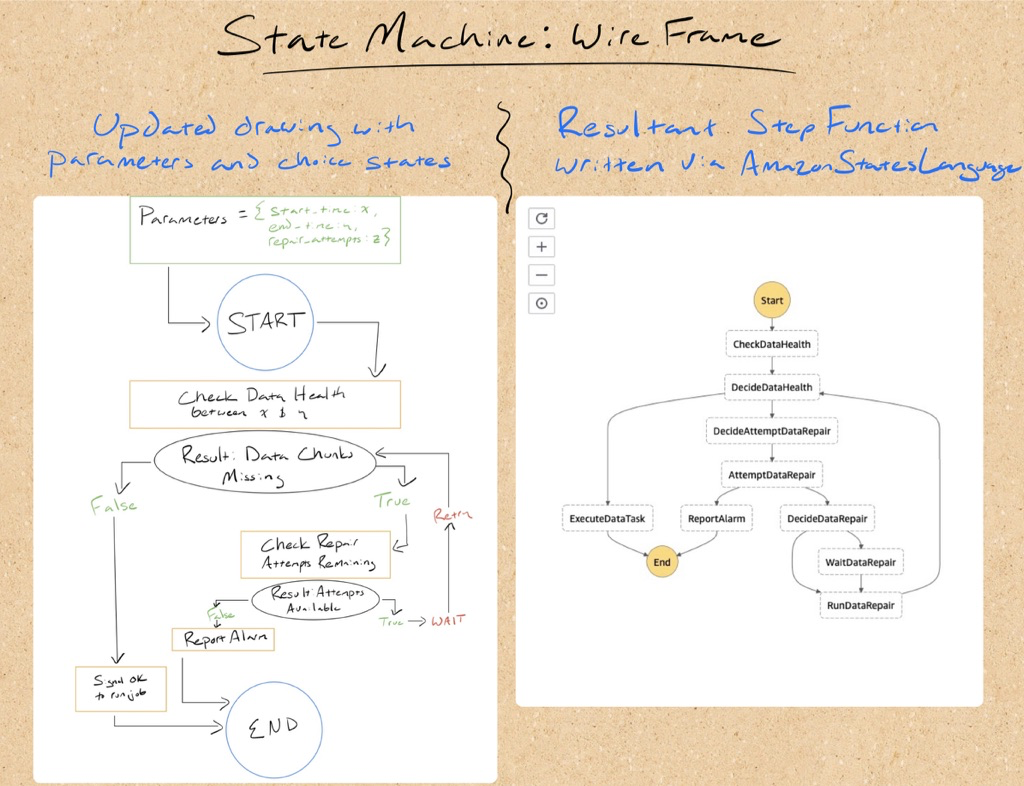
Building a Step Function
I was concerned about writing in Amazon States Language (aka JSON, jk) and how that would work with incorporating that into CloudFormation. I have seen other projects on GitHub use CloudFormation’s join function to join together a multi-line string representing a JSON blob. I did not like that because that offered no syntax checks as you write. Instead, I did a little homework and learned that SAM can handle locally defined Step Functions whether it is stored in a local JSON file or described via YAML within a CloudFormation template. Today’s Github commit contains the following YAML now included in my project’s template:
DataTaskWithHealthCheck:
  Type: AWS::Serverless::StateMachine
  Properties:
    Definition:
      StartAt: CheckDataHealth
      States:
        CheckDataHealth:
          Type: Pass
          Result: Payload
          Next: DecideDataHealth
        DecideDataHealth:
          Type: Choice
          Choices:
            - Variable: $.health_pass
              BooleanEquals: false
              Next: DecideAttemptDataRepair
            - Variable: $.health_pass
              BooleanEquals: true
              Next: ExecuteDataTask
        DecideAttemptDataRepair:
          Type: Pass
          Result: foo
          Next: AttemptDataRepair
        AttemptDataRepair:
          Type: Choice
          Choices:
            - Variable: $.attempt_repair
              BooleanEquals: false
              Next: ReportAlarm
            - Variable: $.attempt_repair
              BooleanEquals: true
              Next: DecideDataRepair
        ReportAlarm:
          Type: Pass
          Result: foo
          End: true
        DecideDataRepair:
          Type: Choice
          Choices:
            - Variable: $.attempt_count
              NumericEquals: 1
              Next: RunDataRepair
            - Variable: $.attempt_count
              NumericGreaterThan: 1
              Next: WaitDataRepair
        WaitDataRepair:
          Type: Wait
          Seconds: 180
          Next: RunDataRepair
        RunDataRepair:
          Type: Pass
          Result: foo
          Next: DecideDataHealth
        ExecuteDataTask:
          Type: Pass
          Result: foo
          End: true
    Role: !GetAtt IAMRoleProject.Arn
One challenge I had while writing this was keeping track of where I was. I am not aware of validation plug-ins or linters I could use to validate the syntax as I moved along. Afterwards, I was curious if there are any visual tools out there to help… and sure enough someone hi-jacked some of the data fields in Draw.IO to let you draw step functions visually.
Coming up next
- Revisit the Athena query: I still need to go back and rethink the date type I am using for missing minutes reported by Athena. The motivation here is to simplify data transformations and avoid converting back and forth between unix epoch timestamp and a datetime object if it does not add value.
- Start filling in the Step Function: The above variable references are are all placeholders. Further, the action nodes are currently a “Pass” state when they should actually be “Task” states pointing at a Lambda function. In short, I am at the point where I need to start tying everything together.