Vacation Project: Day One Learning
June 17, 2020
The basic infrastructure is complete: code grabs stock data from Finnhub and pushes the result into a data stream where it eventually gets stored in a data lake. The API secret token is stored in AWS Secrets Manager and never exposed. Everything is deployed via CloudFormation; you can start looking at my code on Github.
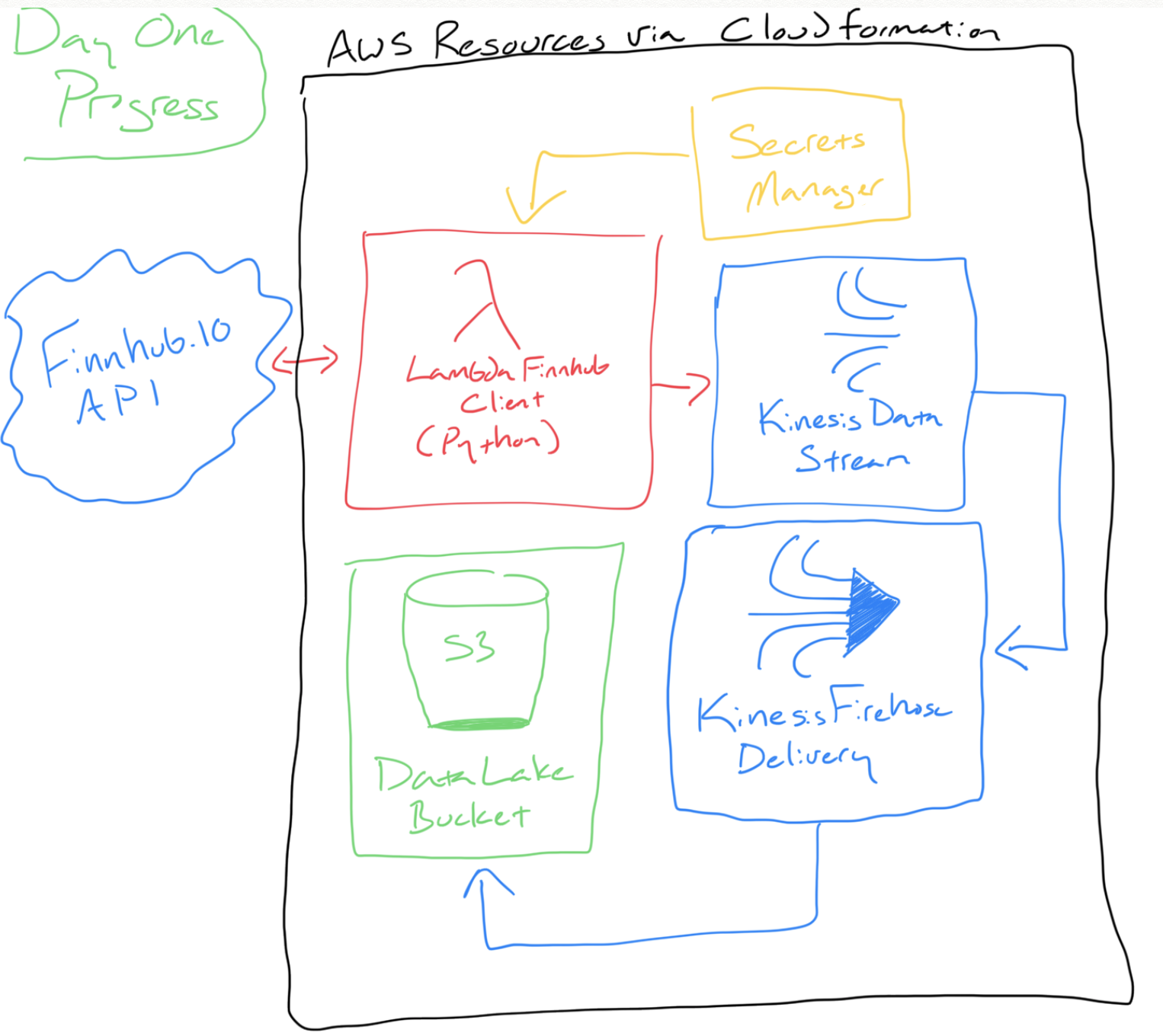
More hand-drawn diagrams FTW!
Solution So Far
Wrote some Python in an AWS Lambda Function to handle the data movement between Finnhub’s API and my solution. I designed this Lambda to be triggered via a queue message; hence why you see it first parsing Simple Queue Service (SQS) messages. The main function is pretty easy to understand:
# AWS LAMBDA - PYTHON 3.6
# SOURCE: FINNHUB.IO CLIENT
# TARGET: KINESIS DATA STREAM

def lambda_handler(event, context):
    # Prepare SQS message bodies for processing
    messages = parse_sqs_messages(event)

    # Process each SQS message body
    for message in messages:
        # Prepare variable values
        symbol = message['symbol']
        epoch_now = get_now_epoch_minute_rounded()

        # Pull latest stock quote via Finnhub
        finnhub_data = get_current_finnhub_quote(symbol)

        # Prepare payload for data stream
        payload = prepare_payload(
            symbol,
            epoch_now,
            finnhub_data
        )

        # Push payload into data stream
        response = push_to_data_stream(
            payload,
            get_environ_variable("finnhubdatastream")
        )
Learnings So Far
- Using the Finnhub.io API
- This is my first time using this API and so far it has been pretty good. The two commands I plan on using are
?stockfor current stock quote information and?candlefor historical stock quote information.?stock’s response includes the epoch timestamp (number of seconds since1970-01-01 00:00:00 UTC) as of the second you requested it.- eg:
1592415210=2020-06-17 17:33:30.
- eg:
?candle’s response can drill down to per-minute values and the related epoch timestamp is rounded to the minute with zero seconds.- eg:
1592415180=2020-06-17 17:33:00instead of1592415210=2020-06-17 17:33:30.
- eg:
- Why is this important? I want this stream to “self-heal” so I need to consider some predictable facts to help determine if data is missing. If I expect data on a per-minute basis then I need to handle the fact that some timestamps include seconds and some do not.
- To help manage all the timestamps, I wrote the method
get_now_epoch_minute_rounded()to return the epoch timestamp that rounds to the minute. This way if every Finnhub data pull includes this rounded timestamp, I will have a predictable collection of timestamps throughout the day to look for.
- To help manage all the timestamps, I wrote the method
- This is my first time using this API and so far it has been pretty good. The two commands I plan on using are
- Executing Lambda on a per-minute basis
- Outside of CloudFormation, I used the web console to stand up a basic Lambda function to execute every minute and report the current epoch timestamp. I did this so I could measure how soon after the minute did the Lambda actually execute. I expect some delay and wanted to see if there is a risk that having a planned execution at minute 0 ends up executing closer to minute 1. I analyzed about 12 hours of execution data and found that the Lambda executes about 1.5-1.7 seconds after the minute occurs. Fortunately that means the risk of a function executing closer to the next minute than the current minute is pretty low.
- Incorporating Secrets Manager into my solution
- I have used Secrets Manager in the past to help with creating database credentials. It is nice because it minimizes the human work and risk associated to crafting credentials. Normally I do this during CloudFormation resource creation (related doc) and if I ever need the secret, I can do an API call or visit the web console.
- In this case, Finnhub gave me an API token that I need to store as a secret and reference in my solution. So instead of asking Secrets Manager to create my secrets, I needed to use it to reference a secret that was provided to me. I simply used the web console to store the secret. I ended up using two methods to retrieve the secret:
- CloudFormation Dynamic Reference: In this approach, I created a dynamic reference that loaded one of Lambda’s environmental variables with the secret API token. This worked great but there was one problem: my local SAM environment does not pull down dynamic references. So while this approached worked great when deployed to my AWS account, I could not rely on it when doing local testing. I will definitely use this solution in the future but not for this effort.
- Secrets Manager client via Python (boto3) SDK: In this approach, I used a method in my Lambda to build a boto3 client to pull the secret. It works well but compared to a dynamic reference, it takes a bit of code with error handling to do right.
What Lies Ahead
Next steps include:
- Configuring a queue to trigger the “current stock data pull” Lambda.
- Building a “request current stock data pull” Lambda to drop a message in the above queue.
- Configuring a CloudWatch Event to execute the “request current stock data pull” every minute.
- This is what is going to initiate a per-minute request for the N number of stock symbols I am interested in.